Mastering AI is about practice, not just technical skills

Henry Lim
Marketing & Communications Manager
4 lessons learned from 4 products launched by our designers
We recently shared what it means to become “AI-native”. In a nutshell: AI tools finally let us act directly on finished products, and no longer only on the “specifications” that mockups or prototypes are.
This situation pushes us to redefine our role: we must now position ourselves on the side of outcomes and impact, not just means.
And this is not just a theoretical stance. For months, we have been putting these technologies to the test behind the agency’s scenes to probe their limits.
Today, here are 4 convictions we drew from this new way of working, illustrated by 4 real products shipped by the team.
1. AI enables traction, the Designer creates retention
Vibe Coding and ready-to-use components are incredibly effective for getting an MVP out the door, solving a technical problem, and proving a concept (traction). But faced with thousands of AI-generated apps flooding the stores, a standardized UI, even a very clean one, is not enough. This is where the designer’s role becomes vital: to go beyond what already exists to create preference and retain the user (retention).
🛠️ The Nestor example
By Jules Bassoleil, Co-founder @ Source.paris
The project: An iOS app to plan family menus and automatically generate shopping lists sorted by aisle.
Stack: Cursor (Claude Opus 4.6), Xcode, Firebase, Supadata, Superwall
Project duration: One week for the first beta
Status: published on the App Store
I had never written a line of SwiftUI. A few weeks later, Nestor was on the App Store: real-time sync, import from any source, AI-generated images. On the technical side, AI made everything possible.
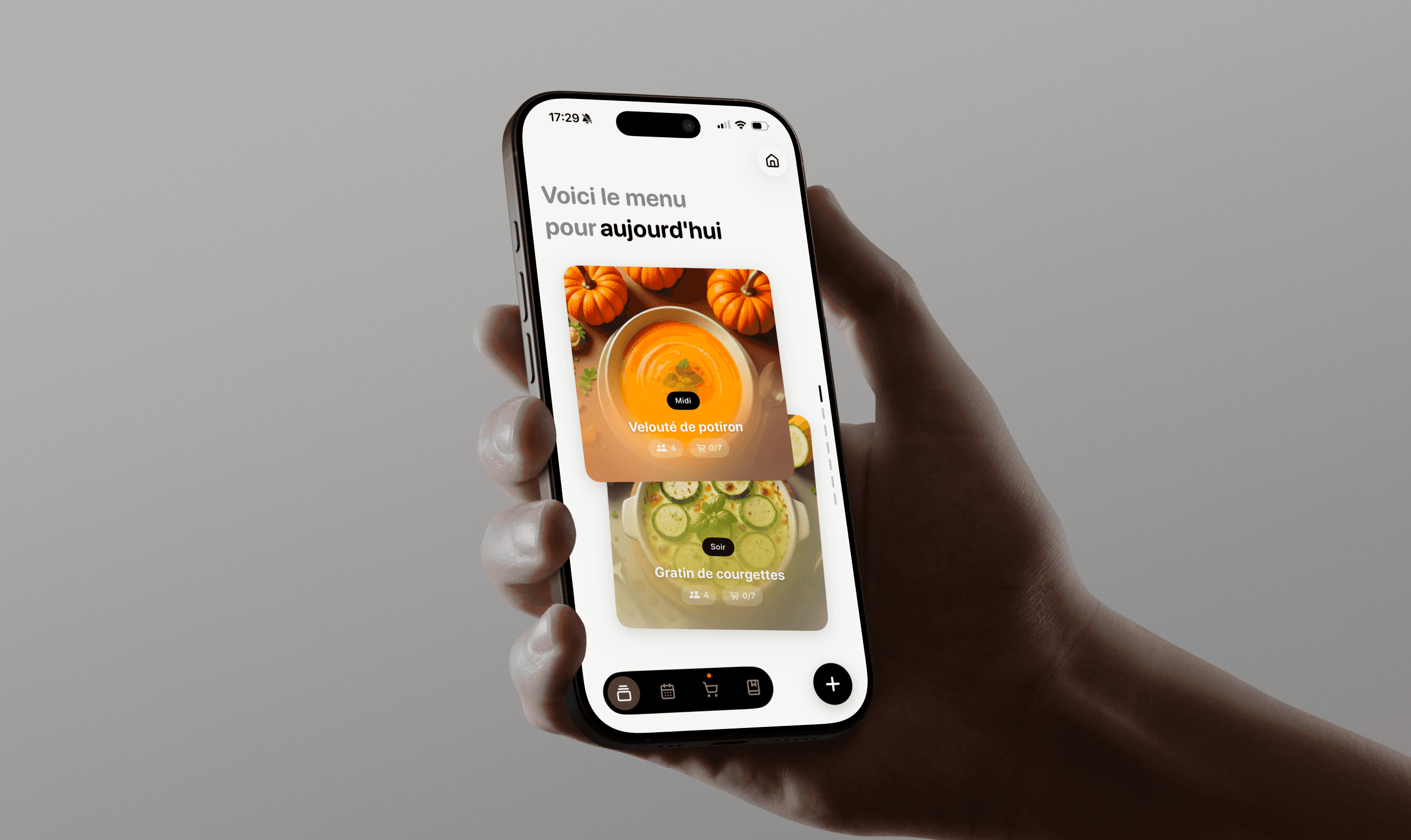
But what it can’t decide is what matters most. That the app be monochrome, black-white-gray, because simplicity is a deliberate choice. That the mascot celebrate the end of grocery shopping with confetti, because a chore deserves to be celebrated. That the paywall only appear after value has been proven, never before.
These decisions are not prompted. They are designed. AI coded what I had decided, and it is that direction that makes the experience memorable.
2. Feature First, Design Second
The era when we froze all the design in Figma before writing a single line of code is over. Today’s approach is to focus first on functionality by relying on native components or standard libraries. We stabilize the user experience, interactions, and app form factor directly in code, and only return to Figma later to design and inject the final look & feel.
🛠️ The Vet Companion example
By Maxime Frere, Principal Designer @ Source.paris
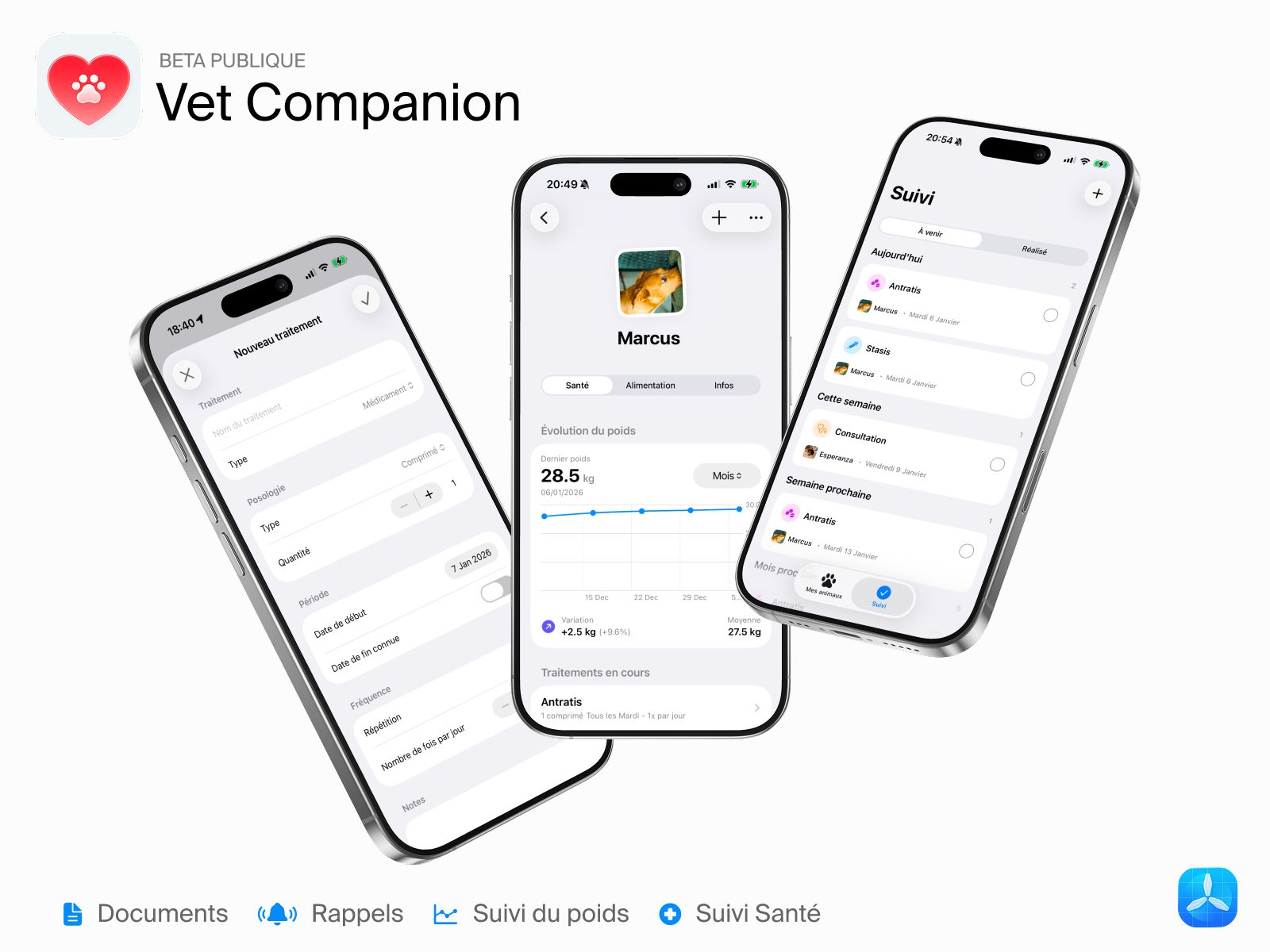
The project: A health record on iOS (native app) to centralize medical tracking (weight, vaccines, treatments) for dogs and cats.
Stack: Cursor + Subagents, Claude Opus 4.6, Xcode
Duration: 3 intense days to reach a first beta.
Status: Public beta
For this project, I deliberately revisited my workflow by trying not to use Figma. With a Feature First philosophy, I coded the interface directly in Swift UI via Cursor. Figma was only used to open Apple’s UI Kit to check the exact name of certain components: a necessity for properly prompting the AI. By designing in code, I capitalized on Apple’s design language, which includes fluid animations, Dark Mode adaptation and seamless integration into the iOS ecosystem.
3. The magic prompt does not exist: you need a method
Vibe-coding tools push users to directly “prompt” their idea, almost instinctively. We recommend instead spending time talking with an AI in orchestrator mode, before touching a coding tool.
This phase is essential to clarify the need, define the technical architecture, and write a PRD (Product Requirement Document). It is something common to all our projects, not just the ones presented today. A useful framework to structure this step: BMAD, an open source method that organizes dialogue with AI around specific roles (Business Analyst, Architect, Developer…).
🛠️ The La Comédie des Alpes example
By Olivier Chatel, Managing Director @ Source.paris
The project: A web app allowing the audience of a café-theatre to choose their seat on a tablet and obtain a physical ticket printed on site.
Stack: ChatGPT-5, Lovable, Supabase, Cursor, GitHub
Project duration: About 5 days spread over a one-month period
Status: Used at the theater box office
This project involved creating a web app, with a CMS to manage performances in the back end, and a seating plan in the front end. All of it needed to communicate with a receipt printer.
For this last point, AI played the role of a true CTO: it guided the choice of hardware (printer + router), network configuration and the integration of Epson’s SDK into the web app. Cursor then took over from Lovable to handle the most technical part, via GitHub branches to secure the production environment.
If Lovable is an incredible playground for testing and iterating quickly, it can quickly show its limits in terms of cost if the product scales (same with Supabase). Today I would rather use Cursor to start new projects.
The prompt “Ask me all the relevant questions to understand my need” remains a real game-changer. It forces you to frame the product perfectly before coding anything.
4. AI memory is fragile: document and version everything
If a PRD or the BMAD framework are perfect for kicking off the project, they quickly become obsolete: as iterations go by, the AI will naturally drift away from them. To avoid it losing context or hallucinating, it is crucial to continuously document progress via synthetic reference files in Markdown and to save your progress on Git branches.
🛠️ The Dressmi example
By Guillem Cotcha, Product Designer @ Source.paris
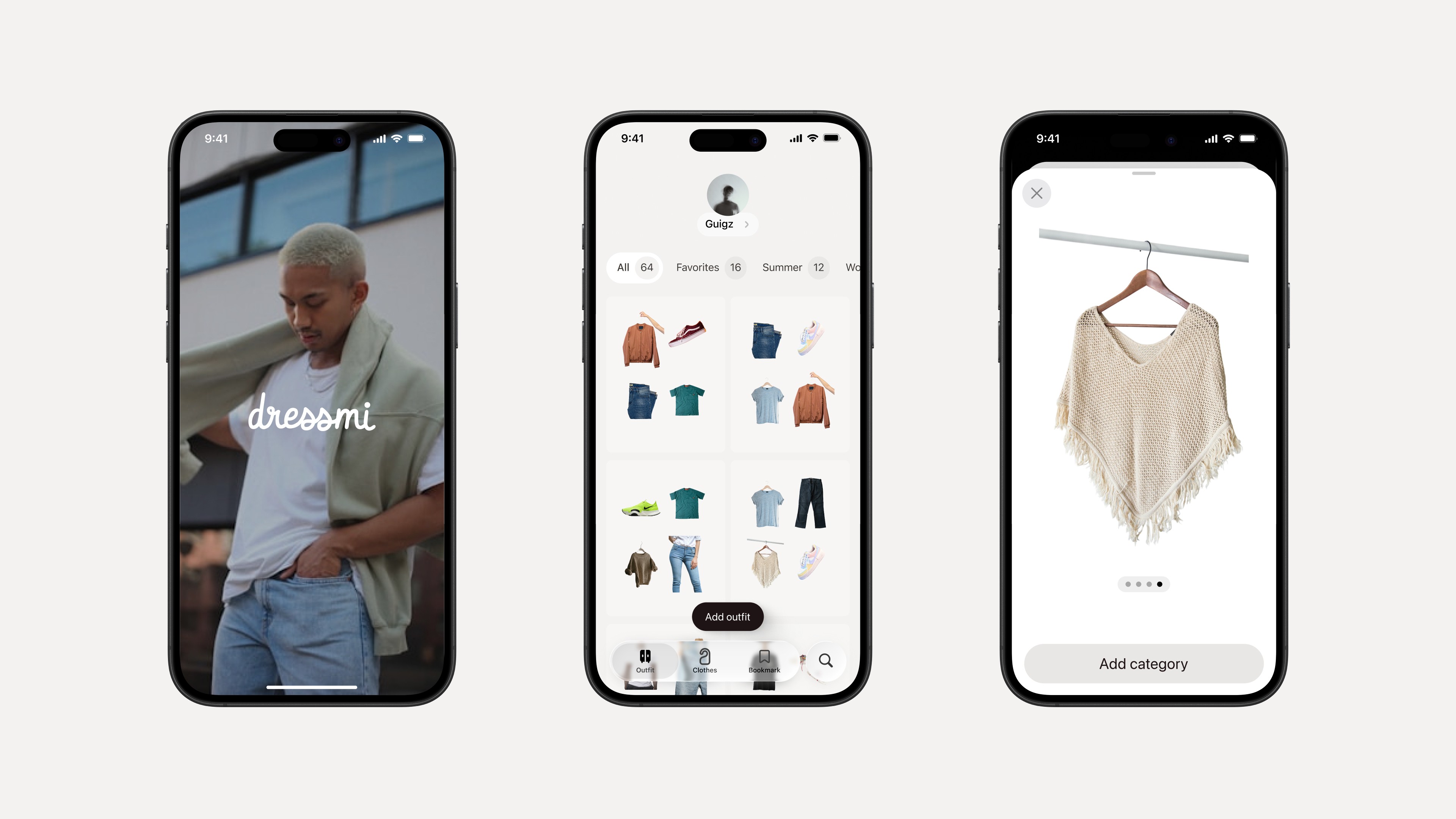
The project : A virtual wardrobe to save and categorize outfits and inspirations. An iOS project in development since 2023, long slowed down by lack of time and technical skills.
Stack : Perplexity (PO), Claude Code (CTO), Supabase, Figma MCP, Xcode
Status : Under development
Here, AI was not used to create an app from scratch, but to unblock and completely redesign the API of an existing project in a single session.
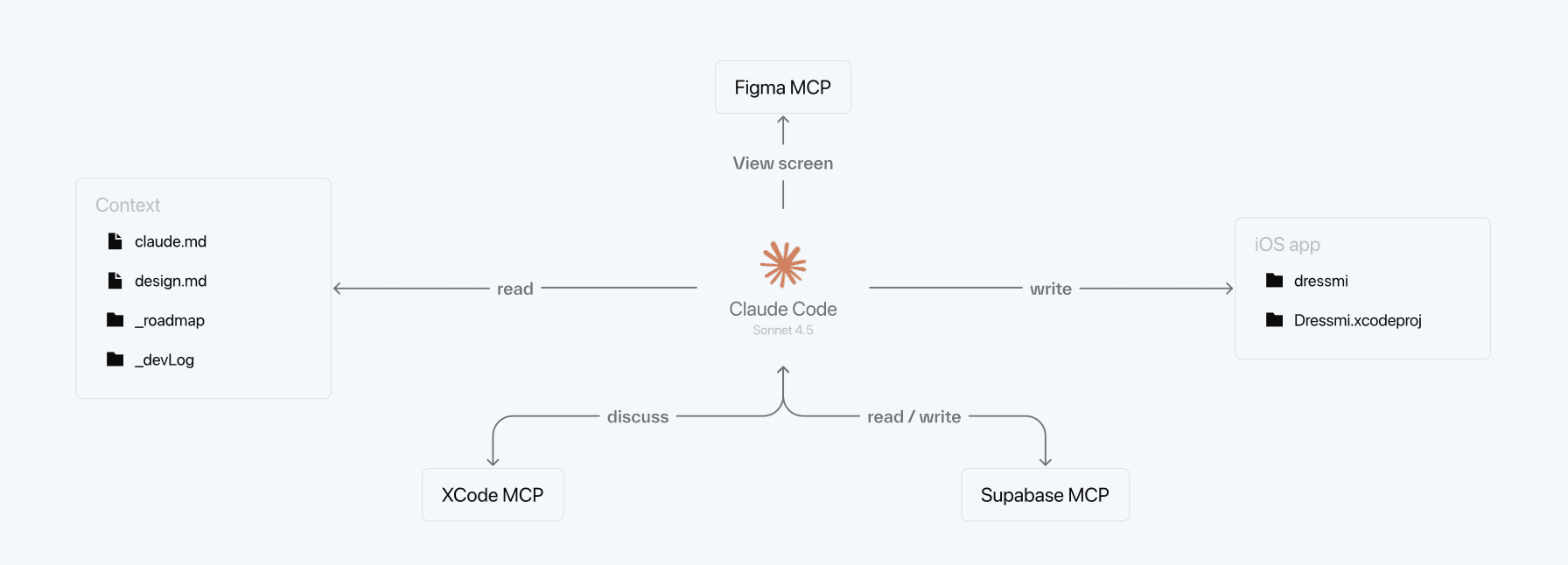
Rebuilding a project’s API and putting it into production very quickly is possible with Claude. Keeping it running over time without the AI losing the thread is harder.
To address that, I set up a true “contextual coding ecosystem.” Perplexity acts as my PO for research and the gathering of documentation, and Claude as my CTO to interpret and execute it. Above all, the project lives thanks to Markdown files (prd.md, design.md, _devLog) placed directly in the code folder. There I meticulously document every error and every technical solution to build a knowledge base. The AI reads these files like a table of contents to feed its context and maintain the project’s overall vision.
Learning by building, together
We chose to support this transition in a concrete and structured way, because not all designers on the team are exposed in the same way to these new practices in client contexts. If some projects serve as real-world testing grounds, we also set aside collective time to practice, learn and progress, encouraging everyone to rely on personal projects that matter to them. This also includes covering tools like Cursor or Lovable, to give the team the means to learn by building.
We recently shared what it means to become “AI-native”. In a nutshell: AI tools finally let us act directly on finished products, and no longer only on the “specifications” that mockups or prototypes are.
This situation pushes us to redefine our role: we must now position ourselves on the side of outcomes and impact, not just means.
And this is not just a theoretical stance. For months, we have been putting these technologies to the test behind the agency’s scenes to probe their limits.
Today, here are 4 convictions we drew from this new way of working, illustrated by 4 real products shipped by the team.
1. AI enables traction, the Designer creates retention
Vibe Coding and ready-to-use components are incredibly effective for getting an MVP out the door, solving a technical problem, and proving a concept (traction). But faced with thousands of AI-generated apps flooding the stores, a standardized UI, even a very clean one, is not enough. This is where the designer’s role becomes vital: to go beyond what already exists to create preference and retain the user (retention).
🛠️ The Nestor example
By Jules Bassoleil, Co-founder @ Source.paris
The project: An iOS app to plan family menus and automatically generate shopping lists sorted by aisle.
Stack: Cursor (Claude Opus 4.6), Xcode, Firebase, Supadata, Superwall
Project duration: One week for the first beta
Status: published on the App Store
I had never written a line of SwiftUI. A few weeks later, Nestor was on the App Store: real-time sync, import from any source, AI-generated images. On the technical side, AI made everything possible.
But what it can’t decide is what matters most. That the app be monochrome, black-white-gray, because simplicity is a deliberate choice. That the mascot celebrate the end of grocery shopping with confetti, because a chore deserves to be celebrated. That the paywall only appear after value has been proven, never before.
These decisions are not prompted. They are designed. AI coded what I had decided, and it is that direction that makes the experience memorable.
2. Feature First, Design Second
The era when we froze all the design in Figma before writing a single line of code is over. Today’s approach is to focus first on functionality by relying on native components or standard libraries. We stabilize the user experience, interactions, and app form factor directly in code, and only return to Figma later to design and inject the final look & feel.
🛠️ The Vet Companion example
By Maxime Frere, Principal Designer @ Source.paris
The project: A health record on iOS (native app) to centralize medical tracking (weight, vaccines, treatments) for dogs and cats.
Stack: Cursor + Subagents, Claude Opus 4.6, Xcode
Duration: 3 intense days to reach a first beta.
Status: Public beta
For this project, I deliberately revisited my workflow by trying not to use Figma. With a Feature First philosophy, I coded the interface directly in Swift UI via Cursor. Figma was only used to open Apple’s UI Kit to check the exact name of certain components: a necessity for properly prompting the AI. By designing in code, I capitalized on Apple’s design language, which includes fluid animations, Dark Mode adaptation and seamless integration into the iOS ecosystem.
3. The magic prompt does not exist: you need a method
Vibe-coding tools push users to directly “prompt” their idea, almost instinctively. We recommend instead spending time talking with an AI in orchestrator mode, before touching a coding tool.
This phase is essential to clarify the need, define the technical architecture, and write a PRD (Product Requirement Document). It is something common to all our projects, not just the ones presented today. A useful framework to structure this step: BMAD, an open source method that organizes dialogue with AI around specific roles (Business Analyst, Architect, Developer…).
🛠️ The La Comédie des Alpes example
By Olivier Chatel, Managing Director @ Source.paris
The project: A web app allowing the audience of a café-theatre to choose their seat on a tablet and obtain a physical ticket printed on site.
Stack: ChatGPT-5, Lovable, Supabase, Cursor, GitHub
Project duration: About 5 days spread over a one-month period
Status: Used at the theater box office
This project involved creating a web app, with a CMS to manage performances in the back end, and a seating plan in the front end. All of it needed to communicate with a receipt printer.
For this last point, AI played the role of a true CTO: it guided the choice of hardware (printer + router), network configuration and the integration of Epson’s SDK into the web app. Cursor then took over from Lovable to handle the most technical part, via GitHub branches to secure the production environment.
If Lovable is an incredible playground for testing and iterating quickly, it can quickly show its limits in terms of cost if the product scales (same with Supabase). Today I would rather use Cursor to start new projects.
The prompt “Ask me all the relevant questions to understand my need” remains a real game-changer. It forces you to frame the product perfectly before coding anything.
4. AI memory is fragile: document and version everything
If a PRD or the BMAD framework are perfect for kicking off the project, they quickly become obsolete: as iterations go by, the AI will naturally drift away from them. To avoid it losing context or hallucinating, it is crucial to continuously document progress via synthetic reference files in Markdown and to save your progress on Git branches.
🛠️ The Dressmi example
By Guillem Cotcha, Product Designer @ Source.paris
The project : A virtual wardrobe to save and categorize outfits and inspirations. An iOS project in development since 2023, long slowed down by lack of time and technical skills.
Stack : Perplexity (PO), Claude Code (CTO), Supabase, Figma MCP, Xcode
Status : Under development
Here, AI was not used to create an app from scratch, but to unblock and completely redesign the API of an existing project in a single session.
Rebuilding a project’s API and putting it into production very quickly is possible with Claude. Keeping it running over time without the AI losing the thread is harder.
To address that, I set up a true “contextual coding ecosystem.” Perplexity acts as my PO for research and the gathering of documentation, and Claude as my CTO to interpret and execute it. Above all, the project lives thanks to Markdown files (prd.md, design.md, _devLog) placed directly in the code folder. There I meticulously document every error and every technical solution to build a knowledge base. The AI reads these files like a table of contents to feed its context and maintain the project’s overall vision.
Learning by building, together
We chose to support this transition in a concrete and structured way, because not all designers on the team are exposed in the same way to these new practices in client contexts. If some projects serve as real-world testing grounds, we also set aside collective time to practice, learn and progress, encouraging everyone to rely on personal projects that matter to them. This also includes covering tools like Cursor or Lovable, to give the team the means to learn by building.
4 lessons learned from 4 products launched by our designers
We recently shared what it means to become “AI-native”. In a nutshell: AI tools finally let us act directly on finished products, and no longer only on the “specifications” that mockups or prototypes are.
This situation pushes us to redefine our role: we must now position ourselves on the side of outcomes and impact, not just means.
And this is not just a theoretical stance. For months, we have been putting these technologies to the test behind the agency’s scenes to probe their limits.
Today, here are 4 convictions we drew from this new way of working, illustrated by 4 real products shipped by the team.
1. AI enables traction, the Designer creates retention
Vibe Coding and ready-to-use components are incredibly effective for getting an MVP out the door, solving a technical problem, and proving a concept (traction). But faced with thousands of AI-generated apps flooding the stores, a standardized UI, even a very clean one, is not enough. This is where the designer’s role becomes vital: to go beyond what already exists to create preference and retain the user (retention).
🛠️ The Nestor example
By Jules Bassoleil, Co-founder @ Source.paris
The project: An iOS app to plan family menus and automatically generate shopping lists sorted by aisle.
Stack: Cursor (Claude Opus 4.6), Xcode, Firebase, Supadata, Superwall
Project duration: One week for the first beta
Status: published on the App Store
I had never written a line of SwiftUI. A few weeks later, Nestor was on the App Store: real-time sync, import from any source, AI-generated images. On the technical side, AI made everything possible.
But what it can’t decide is what matters most. That the app be monochrome, black-white-gray, because simplicity is a deliberate choice. That the mascot celebrate the end of grocery shopping with confetti, because a chore deserves to be celebrated. That the paywall only appear after value has been proven, never before.
These decisions are not prompted. They are designed. AI coded what I had decided, and it is that direction that makes the experience memorable.
2. Feature First, Design Second
The era when we froze all the design in Figma before writing a single line of code is over. Today’s approach is to focus first on functionality by relying on native components or standard libraries. We stabilize the user experience, interactions, and app form factor directly in code, and only return to Figma later to design and inject the final look & feel.
🛠️ The Vet Companion example
By Maxime Frere, Principal Designer @ Source.paris
The project: A health record on iOS (native app) to centralize medical tracking (weight, vaccines, treatments) for dogs and cats.
Stack: Cursor + Subagents, Claude Opus 4.6, Xcode
Duration: 3 intense days to reach a first beta.
Status: Public beta
For this project, I deliberately revisited my workflow by trying not to use Figma. With a Feature First philosophy, I coded the interface directly in Swift UI via Cursor. Figma was only used to open Apple’s UI Kit to check the exact name of certain components: a necessity for properly prompting the AI. By designing in code, I capitalized on Apple’s design language, which includes fluid animations, Dark Mode adaptation and seamless integration into the iOS ecosystem.
3. The magic prompt does not exist: you need a method
Vibe-coding tools push users to directly “prompt” their idea, almost instinctively. We recommend instead spending time talking with an AI in orchestrator mode, before touching a coding tool.
This phase is essential to clarify the need, define the technical architecture, and write a PRD (Product Requirement Document). It is something common to all our projects, not just the ones presented today. A useful framework to structure this step: BMAD, an open source method that organizes dialogue with AI around specific roles (Business Analyst, Architect, Developer…).
🛠️ The La Comédie des Alpes example
By Olivier Chatel, Managing Director @ Source.paris
The project: A web app allowing the audience of a café-theatre to choose their seat on a tablet and obtain a physical ticket printed on site.
Stack: ChatGPT-5, Lovable, Supabase, Cursor, GitHub
Project duration: About 5 days spread over a one-month period
Status: Used at the theater box office
This project involved creating a web app, with a CMS to manage performances in the back end, and a seating plan in the front end. All of it needed to communicate with a receipt printer.
For this last point, AI played the role of a true CTO: it guided the choice of hardware (printer + router), network configuration and the integration of Epson’s SDK into the web app. Cursor then took over from Lovable to handle the most technical part, via GitHub branches to secure the production environment.
If Lovable is an incredible playground for testing and iterating quickly, it can quickly show its limits in terms of cost if the product scales (same with Supabase). Today I would rather use Cursor to start new projects.
The prompt “Ask me all the relevant questions to understand my need” remains a real game-changer. It forces you to frame the product perfectly before coding anything.
4. AI memory is fragile: document and version everything
If a PRD or the BMAD framework are perfect for kicking off the project, they quickly become obsolete: as iterations go by, the AI will naturally drift away from them. To avoid it losing context or hallucinating, it is crucial to continuously document progress via synthetic reference files in Markdown and to save your progress on Git branches.
🛠️ The Dressmi example
By Guillem Cotcha, Product Designer @ Source.paris
The project : A virtual wardrobe to save and categorize outfits and inspirations. An iOS project in development since 2023, long slowed down by lack of time and technical skills.
Stack : Perplexity (PO), Claude Code (CTO), Supabase, Figma MCP, Xcode
Status : Under development
Here, AI was not used to create an app from scratch, but to unblock and completely redesign the API of an existing project in a single session.
Rebuilding a project’s API and putting it into production very quickly is possible with Claude. Keeping it running over time without the AI losing the thread is harder.
To address that, I set up a true “contextual coding ecosystem.” Perplexity acts as my PO for research and the gathering of documentation, and Claude as my CTO to interpret and execute it. Above all, the project lives thanks to Markdown files (prd.md, design.md, _devLog) placed directly in the code folder. There I meticulously document every error and every technical solution to build a knowledge base. The AI reads these files like a table of contents to feed its context and maintain the project’s overall vision.
Learning by building, together
We chose to support this transition in a concrete and structured way, because not all designers on the team are exposed in the same way to these new practices in client contexts. If some projects serve as real-world testing grounds, we also set aside collective time to practice, learn and progress, encouraging everyone to rely on personal projects that matter to them. This also includes covering tools like Cursor or Lovable, to give the team the means to learn by building.
Enjoyed this article? You’ll love Open!
Join our newsletter to get the very best of our content every month — insights, client stories and design experiments, straight to your inbox.
Enjoyed this article? You’ll love Open!
Join our newsletter to get the very best of our content every month — insights, client stories and design experiments, straight to your inbox.
Read next